
Ask what will use the extra resolution
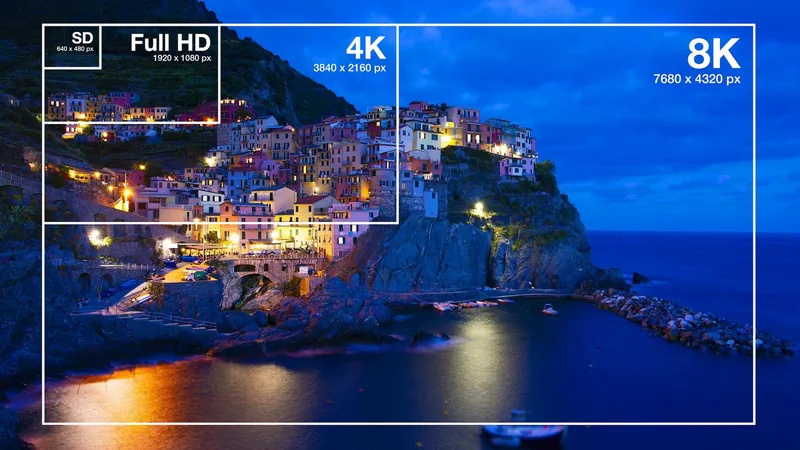
An 8K picture has more pixels than a 4K picture, but that alone does not establish a better purchase for your room. Start with the material you actually watch and the devices supplying it. Check the current resolution and output options of those sources before paying for a capability they may not use.
Judge the complete television
Compare contrast, brightness control, reflections, viewing angle and motion on the exact models under consideration. Also compare the operating system, connection options and accessibility features you use. A resolution label does not describe all of these characteristics.
Upscaling can adapt a lower-resolution picture to the panel. It cannot make the source identical to material captured and delivered with all that extra detail. View your regular content, rather than relying only on a manufacturer's demonstration reel.
Size and distance affect the value
Very fine image detail is harder to distinguish from farther away. Evaluate a prospective screen from approximately your normal seating distance. If you cannot see a useful improvement with the content you care about, spending more on resolution may not be your priority.
Leave room for the installation
Large premium televisions can require careful handling, a different bracket and a revised cable arrangement. Confirm weight and mounting compatibility from the exact model manual. Check your existing cables and source devices against the formats you plan to use, rather than assuming a label on the TV upgrades the whole system.
A practical purchase decision compares the finished cost and the visible benefit. Choosing a well-suited 4K model, improving glare control or adding better audio may be more useful for a particular room. There is no blanket answer that every customer should buy, or avoid, 8K.